
JPG to PDF Converter Online Free
Our free JPG to PDF converter allows you to combine multiple images into a single professional PDF file within seconds. No signup, no watermark, and no software installation required — everything works directly in your browser.
Upload JPG Images
Convert JPG images into a high-quality PDF file instantly.
Benefits and Features
⚡ Fast Image to PDF Conversion
Convert multiple JPG images into a single PDF file instantly without waiting. The process is smooth and optimized for quick results.
🔒 100% Secure & Private
Your images are processed directly in your browser. Nothing is uploaded to any server, so your files remain completely safe.
📄 High-Quality PDF Output
Your images are converted into a clean and high-resolution PDF file without quality loss or compression issues.
📱 Works on All Devices
Use the tool on mobile, tablet, or desktop. No installation or signup required.
How To Use Section
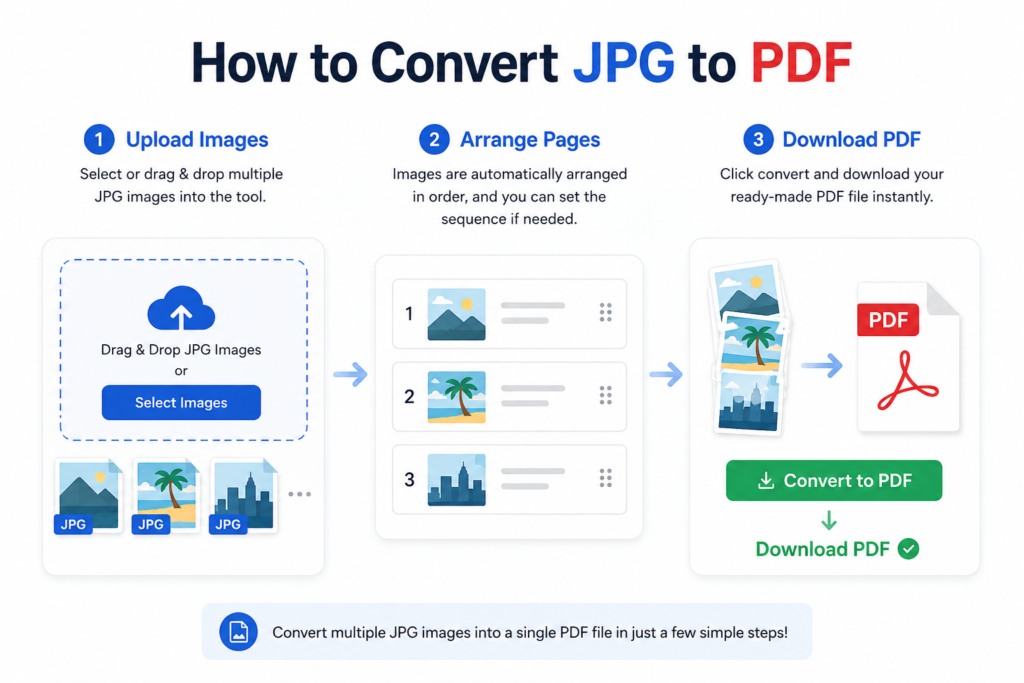
Step 1: Upload Images
Select or drag & drop multiple JPG images into the tool.
Step 2: Arrange Pages
Images are automatically arranged in order, and you can set the sequence if needed.
Step 3: Download PDF
Click convert and download your ready-made PDF file instantly.
FAQ Section
Is JPG to PDF conversion free?
Yes, this tool is completely free with no hidden charges.
Can I upload multiple images?
Yes, you can upload multiple JPG images and combine them into one PDF.
Is my data safe?
Yes, all processing happens in your browser. No files are uploaded anywhere.
Will image quality reduce?
No, the tool preserves original image quality in the final PDF.
Do I need to install anything?
No installation is required. Everything works online.
JPG to PDF Converter Online Free: Convert Images Instantly
Looking for a quick, secure, and completely free JPG to PDF converter online? Whether you need to combine multiple receipts for an expense report, upload official application documents, or stitch together scanned pages into a single file, converting images to PDFs shouldn’t be a headache.
You don’t need to download bulky software or pay for premium subscriptions. Below, we break down how to convert your images instantly, why PDF is the preferred format for sharing, and how to do it safely.
Why Convert JPG to PDF?
While JPG (or JPEG) is the absolute king of digital photos, it isn’t always the best format for professional documents. Converting your images to PDF offers several distinct advantages:
Universal Compatibility: PDFs look exactly the same on any device—whether it’s an iPhone, an Android tablet, a Windows PC, or a Mac. Fonts, layouts, and image quality stay locked in place.
Multi-Image Merging: A JPG can only hold a single image. A PDF allows you to combine 5, 10, or 50 individual images into one cleanly organized, multi-page document.
Smaller File Sizes: High-resolution camera photos can be massive. PDF conversion often applies smart compression, shrinking the file size so it easily clears email attachment limits.
Professional Standard: Most web portals for job applications, university admissions, and government forms strictly require
.pdfuploads, rejecting.jpgor.pngfiles outright.
How to Use a JPG to PDF Converter Online Free
Converting your files takes less than 30 seconds. Most modern web-based tools use a simple, streamlined process:
1.Upload Your JPG Images:Step 1.
Click the “Choose Files” button or simply drag and drop your JPG images directly into the converter window from your desktop or phone gallery.
2.Arrange the Page Order:Step 2.
Once uploaded, you will see thumbnails of your images. Drag and drop the thumbnails to reorder the pages so your final PDF reads exactly how you want it to.
3.Customize Settings (Optional):Step 3.
Adjust your preferences. Most tools let you choose the page size (like A4 or US Letter), orientation (Portrait or Landscape), and margin size.
4.Convert and Download:Step 4.
Click the “Convert to PDF” button. The tool processes your images in seconds. Hit “Download File” to save the newly minted PDF to your device.
Key Features to Look For in an Online Converter
Not all free online tools are created equal. When choosing a web-based converter, make sure it hits these benchmarks:
1. High-Quality Resolution Retention
The tool should compress the file size to make it shareable, but it shouldn’t leave your text blurry or your images pixelated. Look for smart compression that maintains sharp text clarity.
2. Privacy and Secure Data Handling
Security Tip: Always check the platform’s privacy policy. Reputable free online tools use secure SSL encryption to handle your files and promise to automatically delete your data from their servers within one hour of conversion. Never upload highly sensitive, unencrypted personal ID or financial data to a site you don’t trust.
3. Cross-Platform Accessibility
A great online converter runs entirely in your web browser (Chrome, Safari, Firefox, or Edge). This means you can use it seamlessly on your smartphone just as easily as on a laptop, without installing third-party apps.